Nov 24, 2026
Topaz Labs TruEdit on the Yotta AI Gateway: Full-Resolution AI Image Editing, Pricing, and API
Cost Optimization
AI image editing models hand back a smaller image than the one you gave them. Topaz Labs' TruEdit, now on the Yotta AI Gateway, restores the edit to your original's full resolution and keeps the untouched areas consistent with the original. Here is a real example with the numbers, what it costs, and the two requests that run it.
Edit with a Qwen Image model, then restore the result to your original's full resolution. Two calls, one API key.
Ask an AI image editing model to change one thing in a 16 megapixel photo and you get a good edit back at about 2 megapixels. The change is right, but the file is now too small for print, for product zoom, or for anything else that needed the original's detail.
Topaz Labs built TruEdit for that, and it is now live on the Yotta AI Gateway. You edit with one of the Gateway's Qwen Image models, then TruEdit takes the edited result and your original and returns the edit at the original's resolution.
This post covers what TruEdit does, a real example we ran in the console, what it costs, and the two requests that run it.
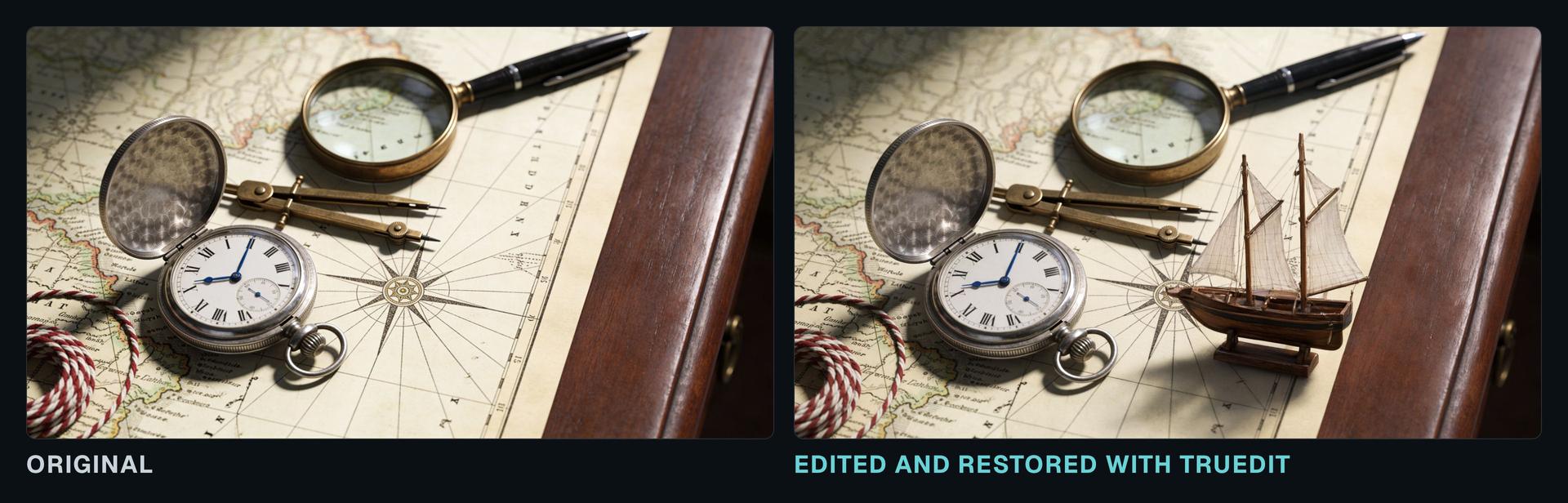
One prompt adds a model ship to a 16.7 megapixel photo, and TruEdit restores the edit to full resolution.
What TruEdit does
TruEdit is a Topaz Labs model in the Gateway's Image-Enhancement category. It is not the model that makes the edit. It is the step after.
It takes two images: your high-resolution original and the lower-resolution edited result. It returns one image at the original's resolution. The console describes it as recovering fine detail while preserving your edit and keeping unchanged areas consistent with the original.
On the Gateway, TruEdit is paired with four editing models: Qwen Image 3.0 Pro, Qwen Image 3.0, Qwen Image 2.1 Pro, and Qwen Image 2.1 Turbo. You pick one on the TruEdit page. The edit and the restore run as two steps and are billed separately.
A real example
We ran one image through the whole flow in the console.
1. Generated a navigator's desk with Seedream 4.5 at 4K: a nautical chart, a pocket watch, a magnifying glass. It came back at 5504 by 3040, which is 16.7 megapixels.
2. Edited it with Qwen Image 3.0 Pro, asking for one new object, a model ship on the chart. The edit came back at 2048 by 1131, which is 2.3 megapixels.
3. Clicked Enhance to run TruEdit. The result came back at 5504 by 3040, the same size as the original.
The edit prompt:
Add a small wooden model sailing ship with white cloth sails, on a little wooden stand, sitting on the chart in the empty lower right area of the map, below and to the right of the compass rose, centered approximately 62% from the left and 78% from the top. Make it about 14% of the image width. Match the existing daylight from the upper left, the perspective, and the colors, and give it a soft natural shadow on the paper. Keep the pocket watch, magnifying glass, brass divider, pen, twine, compass rose, chart and desk unchanged. Preserve the original composition and aspect ratio.
| Step | Model | Output | Time | Cost |
| Generate the original | Seedream 4.5 | 5504 x 3040 | 20 seconds | $0.038 |
| Edit | Qwen Image 3.0 Pro | 2048 x 1131 | 221 seconds | $0.0585 |
| Restore | TruEdit | 5504 x 3040 | 158 seconds | $0.1476 |
| Total | Three models | 5504 x 3040 | 399 seconds | $0.2441 |
At normal size the edited image and the restored image look the same. The difference shows up when you zoom in.
An editing model redraws the whole frame at its own size, so small details far from the edit come back softer. The pocket watch was not part of the edit. In the edited image the small numerals on its seconds dial are smeared. In the TruEdit output they are sharp again, in line with the original.
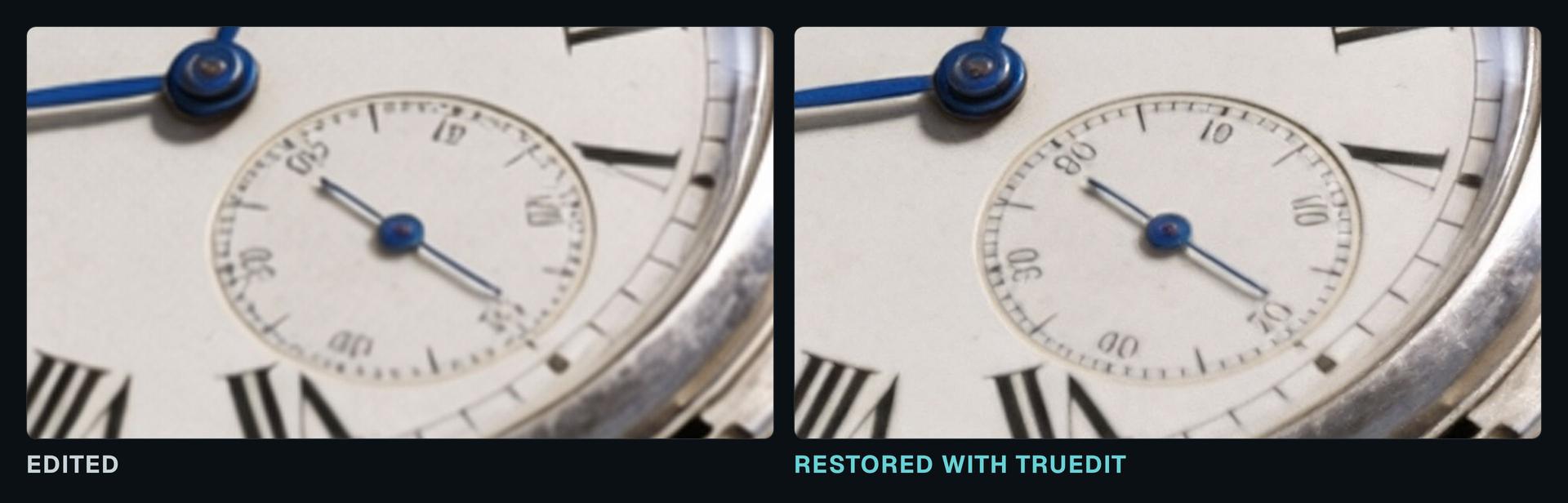
The ship gets the same treatment. It did not exist in the original, so there is nothing to copy it from, and it still comes back at full resolution, 5504 pixels wide like the rest of the image.
What it costs
TruEdit is billed per image, by the size of the output. The console lists four examples.
| Output resolution | Megapixels | Price per image |
| 1080p | 2.1 | $0.0492 |
| 1440p | 3.7 | $0.0492 |
| 4K | 8.3 | $0.0984 |
| 8K | 33.2 | $0.246 |
The rule behind the table: each 8 megapixels of output costs $0.0492, rounded up to the next 8 megapixel block. Our 16.7 megapixel image was three blocks, so $0.1476. The playground shows the exact price on the Enhance button before you run it.
The edit is charged separately, at the editing model's own rate. These are the prices the console quoted for one input image and one 2K edit at time of writing.
| Editing model | Quoted price per edit |
| Qwen Image 2.1 Turbo | $0.0104 |
| Qwen Image 3.0 | $0.0247 |
| Qwen Image 2.1 Pro | $0.026 |
| Qwen Image 3.0 Pro | $0.0585 |
For scale: 100 product photos edited with Qwen Image 2.1 Turbo and restored at 4K is $1.04 for the edits and $9.84 for TruEdit, $10.88 in total.
Because the two steps are billed separately, you only pay for the restore on the edits you keep.
How to run it in the console
1. Open TruEdit under AI Gateway in the Yotta console and pick an editing model.
2. Upload the original. JPEG, PNG, BMP, WEBP, and GIF are accepted, up to 10 MB in the playground.
3. Write the edit as a prompt. Say what to change and what to leave alone. Reference images for an object or a style are optional.
4. Click Run. You get the edited image at the editing model's resolution. You can ask for up to six variations in one run.
5. Click Enhance on the one you want. TruEdit returns it at the original's resolution, with a slider to compare the two.
Both steps show up under Request History. Outputs are stored for 24 hours, so download the ones you want to keep.
How to call it from the API
It is two jobs, with the same async pattern as the rest of the Gateway. POST a job, get a request_id, GET until status is completed, read the output. The base URL is https://gateway.yottalabs.ai/api/maas and every request carries your key in the X-API-KEY header.
Step 1 is the edit. Submit:
POST https://gateway.yottalabs.ai/api/maas/image-edit/generationsRequest body:
{"scene": "truedit", "model": "qwen-image-2.1-turbo", "parameters": {"prompt": "Add a small wooden model sailing ship with white cloth sails, on a little wooden stand, sitting on the chart in the empty lower right area of the map, below and to the right of the compass rose, centered approximately 62% from the left and 78% from the top. Make it about 14% of the image width. Match the existing daylight from the upper left, the perspective, and the colors, and give it a soft natural shadow on the paper. Keep the pocket watch, magnifying glass, brass divider, pen, twine, compass rose, chart and desk unchanged. Preserve the original composition and aspect ratio.", "size": "2048*1131", "enhance_prompt": true, "enable_thinking": true, "seed": 1234, "n": 1, "reference_items": [{"url": "https://example.com/original.jpg", "type": "image"}]}, "providers": ["alibaba"]}Poll:
GET https://gateway.yottalabs.ai/api/maas/image-edit/generations/{request_id}When status is completed, keep the request_id and the output URL of the edit you want.
Step 2 is the restore. Submit:
POST https://gateway.yottalabs.ai/api/maas/image-enhancement/generationsRequest body:
{"scene": "truedit", "model": "truedit", "parameters": {"source_request_id": "REQUEST_ID_OF_THE_EDIT", "source_url": "https://example.com/original.jpg", "lowres_url": "OUTPUT_URL_OF_THE_EDIT", "input_width": 5504, "input_height": 3040}, "providers": ["topaz"]}Poll:
GET https://gateway.yottalabs.ai/api/maas/image-enhancement/generations/{request_id}When status is completed, output_url is the full-resolution image.
The parameters that matter:
- model. The editing model. The console's example uses qwen-image-2.1-turbo. Swap in the ID of the editing model you want.
- scene. Set it to truedit on both requests.
- n. How many edits to generate, from 1 to 6. You pass one of them to TruEdit.
- size. The edit's output size, written as width*height. Keep the original's aspect ratio.
- source_request_id. The request_id of the edit. It has to belong to the same API key.
- source_url. The original image, the same one you sent to the edit.
- lowres_url. The edited image you picked from the edit's outputs.
- input_width and input_height. The original's dimensions in pixels. This is the size you get back.
- prompt. Optional on the TruEdit request.
The API tab on the TruEdit page has a full Python client that runs both steps.
Where it fits
Product and catalog work is the obvious one. Change a colorway, swap a prop, or clean up a background, and still deliver the full-size file the storefront zoom or the print vendor needs.
It also fits any pipeline that starts from a camera original. Editing models are good at the change itself. TruEdit is what lets that change go back into a 16 or 33 megapixel file.
It sits next to Topaz's other models on the Gateway. TruEdit brings an edit back up to the size the image already was. Wonder 3.5 makes an image larger than it was. For video, Starlight does the 4K step after generation. All of them run on the same key.
FAQ
Does TruEdit make the edit?
No. A Qwen Image model makes the edit. TruEdit takes that result and your original and returns the edit at the original's resolution.
Which editing models work with it?
Qwen Image 3.0 Pro, Qwen Image 3.0, Qwen Image 2.1 Pro, and Qwen Image 2.1 Turbo. You choose one in the model picker on the TruEdit page, or by model name in the edit request.
What resolution do I get back?
The original's. You pass the original's width and height in the TruEdit request, and the output matches them. Ours went in at 5504 by 3040 and came back at 5504 by 3040.
Is the edit included in the TruEdit price?
No. The edit is billed at the editing model's rate and TruEdit is billed by output size. Our example was $0.0585 for the edit and $0.1476 for the restore.
Can I look at the edit before I pay for the restore?
Yes. In the playground, Run produces the edit and Enhance is a separate click that shows its price first. In the API they are two separate requests.
How long does it take?
On our 16.7 megapixel image, the edit took 221 seconds with Qwen Image 3.0 Pro and TruEdit took 158 seconds. Edits on Qwen Image 2.1 Turbo took 26 to 36 seconds in our runs. The Providers tab on the TruEdit page showed a typical latency of about a minute when we checked. Set your polling timeout in minutes, not seconds.
How long are outputs kept?
24 hours in Request History. Download what you want to keep.
Bottom line
Editing models are good at the change and small on the output. TruEdit fixes the second part: the edit comes back at the size of the image you started with, and the areas you did not touch get their fine detail back. On the Gateway it is two calls on one key, at $0.0492 per 8 megapixels of output plus the cost of the edit.
Get an API key in the Yotta console, open TruEdit, and run one of your own full-size images through it. The price is on the Enhance button before you click it.