
Nov 03, 2026
How to Generate a Video and Upscale It to 4K on the Yotta AI Gateway with Topaz Labs Starlight
Cost Optimization
Generate a clip with Wan 3.0, then send it to Topaz Labs Starlight for a 4K version, both on the Yotta AI Gateway with one API key. This walkthrough has the exact requests we used, the one command you need in between, and what the whole thing cost.
Two API calls, one key, about a dollar for a 5-second 4K clip.
Most video generation models on the Yotta AI Gateway top out at 1080p, and most of the time you generate at 720p because it is faster and cheaper to iterate. When a clip is worth keeping, you want it bigger. Topaz Labs’ Starlight models run on the same Gateway, so the upscale is one more call on the key you already have.
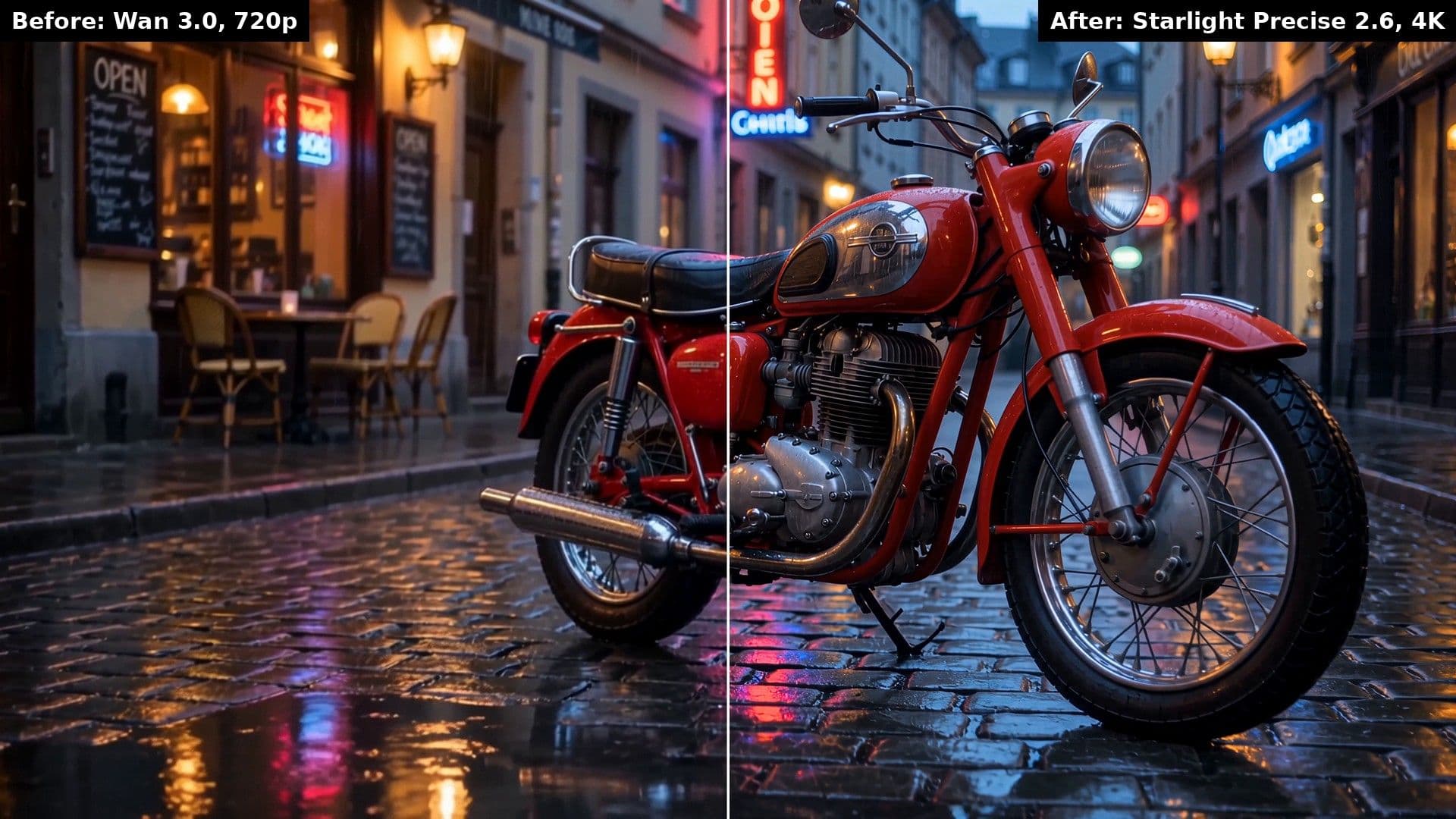
This post walks through the whole flow with a real example we ran for it: a 5-second clip generated with Wan 3.0 at 720p, upscaled to 4K with Starlight Precise 2.6. Here is one frame of the result, split down the middle.
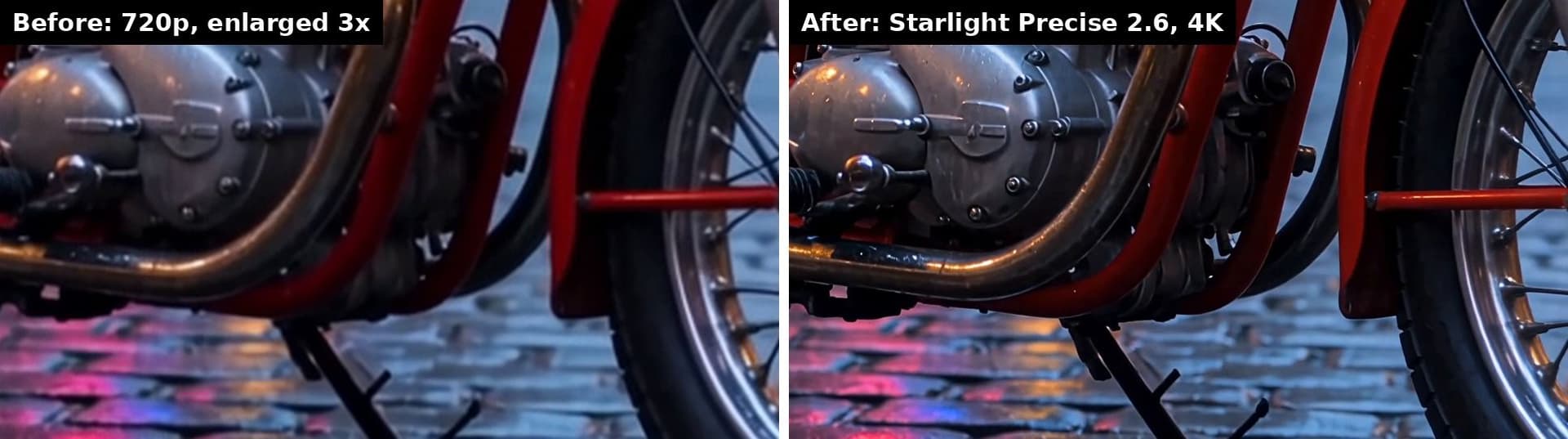
And the same spot on the engine from both files, with the 720p frame enlarged 3x so the crops match.
Generation took 131 seconds and cost $0.35. The upscale took 730 seconds and cost $0.64. The requests below are the ones that produced it.
What you need
- An API key from the Yotta console. Create one under AI Gateway.
- The base URL for video requests: https://gateway.yottalabs.ai/api/maas. Every endpoint below hangs off that.
- The X-API-KEY header on every request, with your key as the value.
- ffprobe, which ships with FFmpeg, for one step in the middle. If you have ffmpeg installed you already have it.
Both models use the same async pattern. POST a job, get a request_id, GET the status until it reads completed, read output_url. If you have used any of the Gateway’s video models before, nothing here is new except the second endpoint.
Step 1: Generate the clip with Wan 3.0
Wan 3.0 text-to-video is model slug wan3.0-t2v. Submit:
POST https://gateway.yottalabs.ai/api/maas/text-to-video/generations
Request body:
{"model": "wan3.0-t2v", "parameters": {"prompt": "A vintage red motorcycle parked on a wet cobblestone street at dusk, light rain, a small cafe with a hand-painted sign reading OPEN in the background, neon reflections in the puddles, slow push-in, cinematic, no people.", "aspect_ratio": "16:9", "resolution": "720p", "duration": 5, "generate_audio": false, "enhance_prompt": true}, "providers": ["alibaba"]}The parameters that matter for this flow:
- resolution. 480p, 720p, or 1080p. Generate at 720p. It is $0.07 per second on the console today, and Starlight is going to replace every pixel anyway.
- duration. An integer from 2 to 30 seconds, or -1 to let the model pick. Set it explicitly. You will need the exact length in step 3, and the upscale is billed per second, so a 5-second clip is a 5-second bill.
- aspect_ratio. 16:9 or 9:16 if you are upscaling. Those are the two Starlight accepts.
- generate_audio. Optional. Audio does not change the Wan 3.0 price at 720p. Starlight works on the video track.
A successful submit returns code 10000 and a request_id. Poll:
GET https://gateway.yottalabs.ai/api/maas/text-to-video/generations/{request_id}
When status is completed, the response carries output_url and duration. Keep both. The URL is the input to step 3.
The Seedance API guide has a full Python client for this half if you want one to copy. Swap the model slug and the parameters and it works for Wan 3.0.
Step 2: Read the clip’s size, duration, and frame count
This is the step people miss. The Starlight endpoint needs four facts about the input video: file size in bytes, duration in seconds, total frame count, and input resolution. Topaz uses them to validate and price the job, and they are required, not optional.
The generation response gives you duration. The other two come from the file. Download the output_url, then:
ffprobe -v error -count_frames -select_streams v:0 -show_entries stream=nb_read_frames -show_entries format=size,duration -of default=noprint_wrappers=1 clip.mp4That prints nb_read_frames, size, and duration. Those are frame_count, size, and duration for the next request. For our clip: 150 frames, 8840144 bytes, 5.0 seconds, which also tells you Wan 3.0 delivered 30 fps. Resolution you already know, because you set it in step 1.
If you are building a pipeline, size also comes from a HEAD request on the output_url (the Content-Length header), and frame count is duration times frame rate. But ffprobe reads the real numbers from the real file, and the request fails if they are wrong, so use it at least once to check your math.
Step 3: Upscale it with Starlight Precise 2.6
Starlight Precise 2.6 is model slug slp-2.6 in the Gateway’s Video-Enhancement category. Submit:
POST https://gateway.yottalabs.ai/api/maas/video-enhancement/generations
Request body:
{"model": "slp-2.6", "parameters": {"reference_items": [{"type": "video", "url": "https://example.com/clip.mp4", "size": 8840144, "duration": 5.0, "frame_count": 150, "resolution": "720p"}], "aspect_ratio": "16:9", "resolution": "4k", "sharpness": 5.0}, "providers": ["topaz"]}The size, duration, and frame_count are the three numbers from step 2. For url, the path has to end in .mp4 or .mov. If your clip’s output_url ends that way, pass it as is. If it carries a signature or query string, download the file and host it at a plain .mp4 URL.
The parameters:
- reference_items. Exactly one item. type is “video”, url ends in .mp4 or .mov, and size, duration, frame_count, and resolution describe the input.
- resolution. The output size: 720p, 1080p, 1440p, or 4k. This is what you are paying for.
- aspect_ratio. 16:9 or 9:16, matching the clip.
- sharpness. Required for Precise 2.6, from 1.0 to 5.0, one decimal place. 5.0 is the default and leans into generative detail. Lower it for a softer, more natural look. Starlight Fast 3 does not take this parameter and rejects it if sent.
Poll the same way:
GET https://gateway.yottalabs.ai/api/maas/video-enhancement/generations/{request_id}
When status is completed, output_url is your 4K clip. Ours came back at 3840 by 2160, 150 frames, 60 MB.
What the whole thing cost
Console rates at time of writing, for the 5-second clip above. The upscale came in a couple of cents over 5 seconds times the rate, which is how the console quoted it, so budget by the quote, not the arithmetic.
| Step | Model | Rate | 5-second clip |
| Generate at 720p | Wan 3.0 | $0.07 per second | $0.35 |
| Upscale to 4K | Starlight Precise 2.6 | $0.124 per second | $0.64 |
| Total | - | - | $0.99 |
Two things worth knowing before you scale this up. The upscale is most of the bill, so decide which clips get the 4K treatment rather than upscaling everything. And Starlight’s 1080p tier is $0.059 per second, so a 720p to 1080p pass on the same clip is $0.30 if 4K is more than you need.
Precise 2.6 or Fast 3 for the upscale step
Both Starlight models cost the same on the Gateway and take the same request, so the choice is speed versus control. Starlight Fast 3 is up to 4x faster by Topaz’s numbers, with comparable 4K output, and it has scene splitting for clips with hard cuts. Precise 2.6 has the sharpness control and is the one Topaz tuned for faces, fabrics, and text.
A practical pattern: run Fast 3 while you are iterating on the prompt, and Precise 2.6 once on the clip you ship. For Fast 3, change the model to slf-3 and drop the sharpness parameter. Everything else in the request stays the same.
Swapping the generator
Step 1 works with any video model on the Gateway. Seedance 2.5, PixVerse V6 and C1, and Kling v3 all return an output_url from the same text-to-video and image-to-video endpoints, and Starlight does not care which model made the clip. The only thing that changes is the generation price, and the Wan 3.0 vs Wan 2.7 post covers why Wan 3.0 is the cheap default.
The same idea applies to stills. Pull a frame from the clip and send it through Topaz Labs Wonder 3.5, the Gateway’s image upscaler, for a poster frame or thumbnail at print size.
From Topaz Labs
Xiaoyu Wang, Head of AI Research at Topaz Labs: “Yotta Labs continues to be a fantastic partner to Topaz Labs, we’re excited to work with them to bring our best enhancement models to users across the globe.”
FAQ
Can I generate and upscale in one request?
No. They are two endpoints and two jobs. You poll the generation job for its output_url, then submit that URL to the enhancement endpoint. Two jobs, one key.
Does the input have to come from the Gateway?
No. Any HTTPS URL ending in .mp4 or .mov works as the reference item, as long as you pass the correct size, duration, frame count, and resolution. Footage from your own camera or archive goes through the same request.
What if the frame count or size is wrong?
The job fails validation. That is why step 2 exists. Read the values from the file with ffprobe rather than estimating them.
Why generate at 720p instead of 1080p?
Price and speed. Wan 3.0 at 1080p is double the 720p rate on the console, and Starlight rebuilds the frames at the target resolution either way. Generate at 720p, iterate until the clip is right, then spend on the upscale once.
How long does the upscale take?
It depends on clip length, output resolution, and load. Our 5-second 30 fps clip took 730 seconds on Precise 2.6 at 4K through the Gateway. Topaz’s own benchmark for a 15-second clip to 4K is about 4 minutes on Fast 3 and about 19 minutes on Precise 2.6 in their web app. Set your polling timeout in minutes, not seconds.
Bottom line
Generate at 720p with the cheapest model that gives you the clip you want, read three numbers off the file, and send it to Starlight. One key, two calls, and a 5-second 4K clip for about a dollar.
Get an API key in the Yotta console and run a clip through it. The Wan 3.0 and Starlight model pages both have a full Python client on the API tab you can paste and go.